OG Image Maker
Generate OG images
with URL parameters
A free tool that creates 1200×630 Open Graph images from a title, background type, and a few URL query parameters.
Features
Why use it
Just paste a URL
Copy the URL from the editor and set it as the og:image. No need to download and upload an image file for every page.
26 backgrounds to choose from
Pick from 26 background variations across Pattern, Geometry, and Gradient categories.
Tune colors to your site
Switch between light and dark modes, then adjust hue, chroma, and lightness to match your brand color.
Cached for fast repeat loads
Generated images are cached for a period of time, so subsequent loads are instant.
Free
Free to use
No login required. Open the editor and start right away.
Gallery
Background variations
Switch colors and layout to preview how each variation looks.
This is just a sample of the available variations.
How to use
Get started in 3 steps
Choose a background in the editor
Open the editor, then choose a background from the Pattern, Geometry, or Gradient card list.
Tune the look in the settings panel
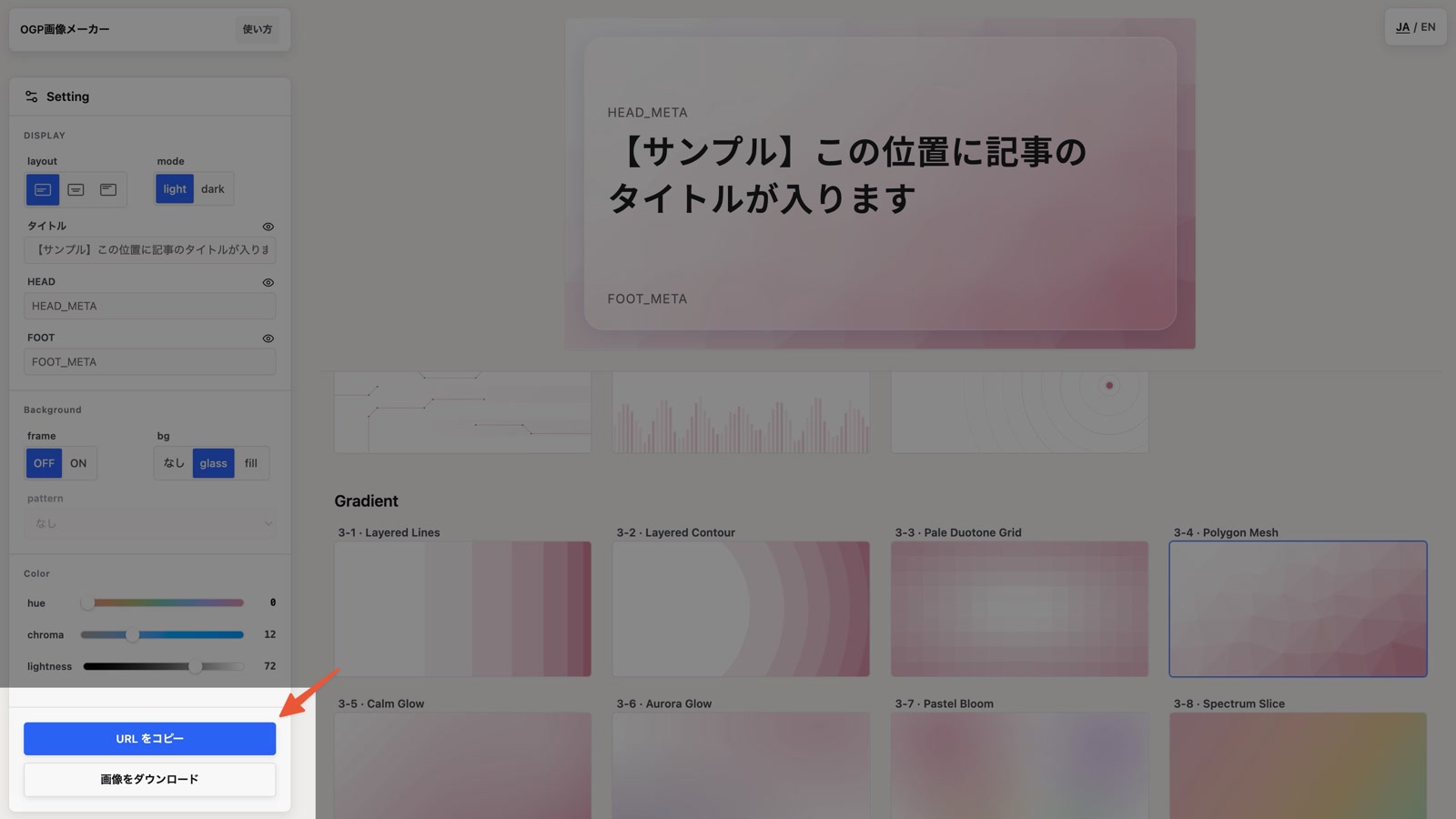
Use the settings panel to adjust text alignment, color, and background effects. Edits apply instantly to the selected card, with sample content so you can preview the final look.
Copy the URL and set it as the og:image
Copy the API URL with the "Copy URL" button at the bottom of the settings panel. Replace YOUR_TITLE_HERE/HEAD_TEXT/FOOT_TEXT with your real text, then set the URL as your page's og:image.
Alternatively, you can download the image. Please note that titles and other information will not be included in the output unless you have explicitly entered them. It is also possible to download only the background and use it in your own product.
FAQ
Frequently asked questions
Yes. You can create an OG image URL from the editor without signing in or creating an account.
Copy the URL from the editor and set it as the og:image on each page. Replace the title and other text parameters in the URL with your own content.
It generates 1200×630 px images, a common Open Graph size that works well for link previews on X, Facebook, and other platforms.
Yes. If you omit text parameters such as title, the API returns a background-only image. The editor also includes a download button for background-only images.
Yes. You can use generated images for personal, corporate, commercial, and non-commercial projects. You may not redistribute or sell the generated images as standalone assets.
For sans we use Gen Interface JP (a typeface that blends Inter for Latin with Noto Sans JP for Japanese); for serif we use Noto Serif JP.